Application Guidance 

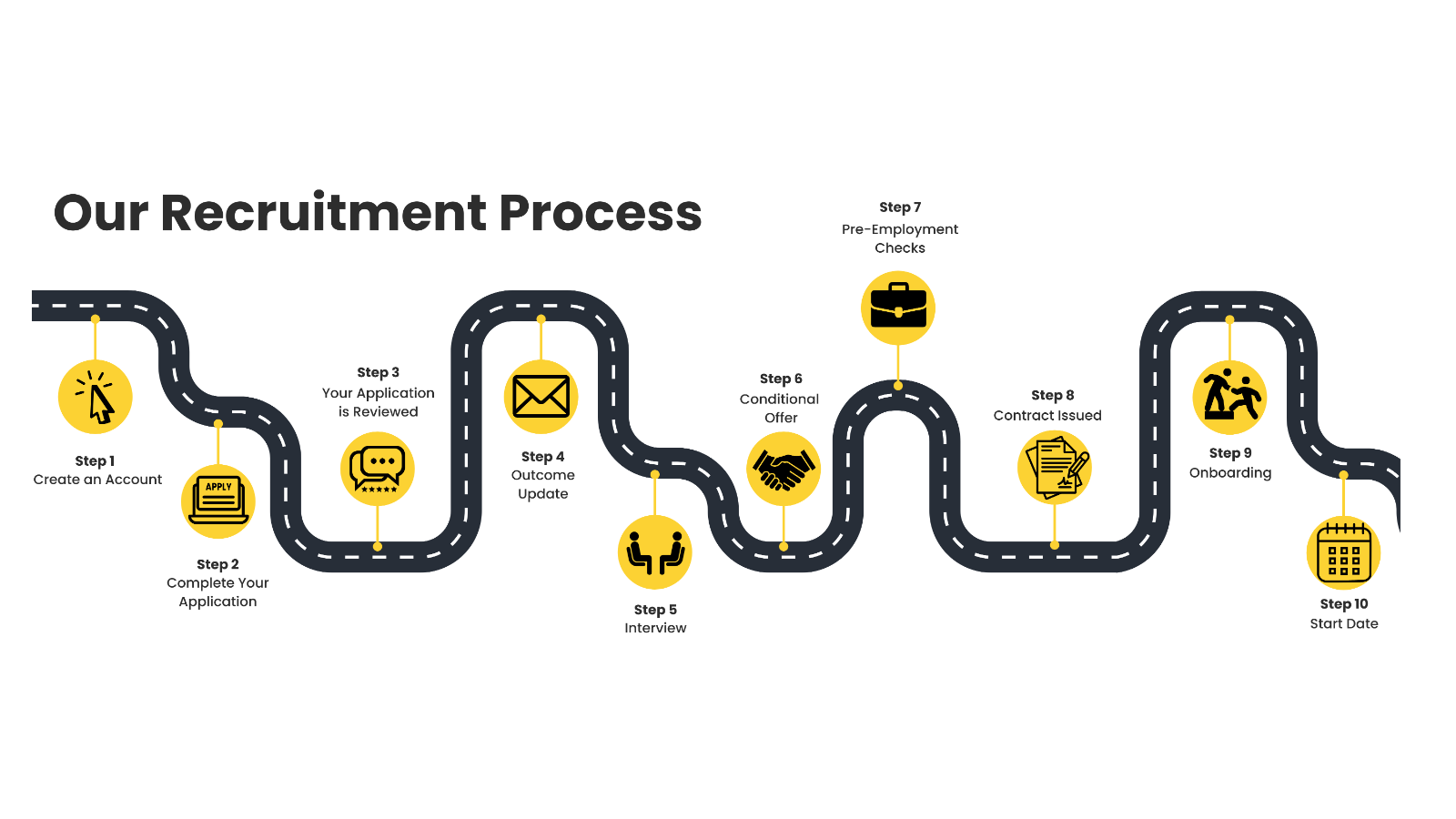
Step 1
 Create an Account 

  • Click Apply 
  •  Register your details on the Luminate Careers Hub.

Step 2
 Complete your Application

  • Complete the online application form and Supporting Statement

Step 3
 Your Application is Reviewed 

  • Vacancy Closes
  • The panel will review all applications
  • All candidates will be advised the outcome of their application

Step 4
 Application Outcome Update

  • All candidates will receive an update on their application
  • If successfully shortlisted - will receive an interview invite

Step 5
Interview

  • Panel Interview 
  • Assessment (if applicable) 
  • Micro Teach (if applicable)

Step 6
Conditional Offer

  • All candidates will receive an update on their interview 
  • If successful - will receive a verbal offer and conditional offer in writing

Step 7
Pre-Employment Checks

  • Pre-employment checks started
  • Tasks to complete 

Step 8
Contract Issued

  • Pre-employment checks completed
  • Start date agreed
  • Contract Sent

Step 9
Onboarding

  • Start onboarding
  • Preparation for Start Date 

Step 10
Start Date

  • Welcome to Luminate
  • Induction

Safer Recruitment

Visa Sponsorship

AI Guidance

Reasonable Adjustments

Disability Confident

Access to Work

Safer Recruitment

We are required to comply with Safer Recruitment as outlined in Keeping Children Safe in Education. This means that our application process is more thorough than some other sectors as we prioritise keeping our students and staff safe. As part of this process, we require all candidates when applying for our vacancies to: 

  • Complete an online Application Form 
  • Complete a Supporting Statement 
  • Provide details of any gaps in employment 
  • Provide a full career history from leaving school/education 

Any candidates offered a role will be required to complete pre-employment checks including: 

  • Enhanced DBS 
  • Proof of right to work in the UK 
  • Two professional references 
  • Online checks 
  • Children and/or adult barred list check (depending on the role) 
  • Fitness to work (via Occupational Health questionnaire) 
  • Section 128 or Prohibition checks (for management or teaching roles) 

For more information on Keeping Children Safe in Education please visit the UK Government website here or if you have any queries, contact us at careers@luminate.ac.uk

Visa Sponsorship

Luminate Education Group is not a licenced sponsor and therefore cannot sponsor visa applications. You will need current and appropriate right to work in the UK to apply for our vacancies.

AI Guidance

At Luminate Education Group we understand that candidates may choose to utilise AI to assist them in their job application. We encourage candidates to ensure that their application is a true representation of themselves, their personality, skills and experience. 

We consider acceptable use of AI to be for research, sense checking, spelling and grammar checks. We discourage candidates from using generic AI responses that have not been reviewed by the candidate. Use of generic AI responses may result in a low scoring application due to a lack of personalisation and real-life examples of the candidates skills and experience. 

Acceptable use of AI 

  • Research 
  • Sense checking 
  • Spelling and grammar checks 

Unacceptable use of AI 

  • Using AI to write supporting statement 
  • Using AI in interviews and assessments (unless given express permission to do so) 
  • Use of generic AI responses

Reasonable Adjustments

We want you to feel welcomed and supported when applying. If you need any adjustments at any stage, just let us know as we are here to help. You can reach us at careers@luminate.ac.uk

Disclosing your disability 

There is no obligation to disclose your disability, but if you wish to make us aware, there is a question in the application form for a candidate to confirm whether they identify as disabled. This is to help us identify candidates who may be eligible under the disability confident scheme when shortlisting for interview. We use anonymous shortlisting, which means that hiring managers will not see any personal details such as name or contact details. They will see your application form, education/career history and an icon if you have confirmed that you identify as disabled, for the purpose of the disability confident scheme. 

Application Stage 

You can contact us if you need assistance with the following: 

  • Request the application form in a different format 
  • Discuss any specific adjustments you may require in the recruitment process Share any feedback about the recruitment process 

Interview Stage 

On receipt of the interview invite, should you require any adjustments for the interview or assessment, please respond to the interview invite email outlining any reasonable adjustments that you may require to attend the interview. 

Onboarding 

Your line manager and our Occupational Health (OH) team can support you with any adjustments you may need. We encourage you to discuss requirements with your line manager before starting, or with OH during onboarding.

Disability Confident

We are proud to be part of the Disability Confident scheme, which recognises employers committed to attracting, recruiting and supporting disabled people at work. This forms part of our inclusive approach to recruitment. 

Candidates who meet the essential criteria and have identified as disabled on their application via the disability question, will be offered an interview (unless there are particularly high levels of applicants, when the group may need to limit overall numbers of interviews offered to both disabled and non-disabled candidates).

Access to Work

Access to Work is a government funded scheme through the Department for Work and Pensions to support people with a physical or mental health condition or disability to get into, or stay in work. The support you may be eligible for will depend on your needs. 

 Through Access to Work, you can apply for: 

  • A grant to help pay for practical support with your work 
  • Support with managing your mental health at work 
  • Money to pay for communication support at job interviews 

For further information, visit the Access to Work website https://www.gov.uk/access-to-work



Step 1
 Create an Account 

  • Click Apply 
  •  Register your details on the Luminate Careers Hub.

Step 2
 Complete your Application

  • Complete the online application form and Supporting Statement

Step 3
Your Application is Reviewed

  • Vacancy closes 
  • The panel will review all applications 
  • All candidates will be advised the outcome of their application

Step 4
Application Outcome Update

  • All candidates will receive an update on their application 
  • If successfully shortlisted - will receive an interview invite 
  •  If unsuccessful will receive an email advising

Step 5
Interview

  • Panel Interview 
  • Assessment (if applicable) 
  • Micro Teach (if applicable)

Step 6
Conditional Offer

  • All candidates will receive an update on their interview 
  • If successful - will receive a verbal offer and conditional offer in writing
  • If unsuccessful - will receive feedback

Step 7
Pre-Employment Checks

  • Conditional Offer sent 
  • Pre-Employment checks started 
  • Tasks to complete

Step 8
 Contract Issued

  • Pre-employment checks completed 
  •  Start date agreed 
  • Contract sent

Step 9
Onboarding

  • Start onboarding
  • Preparation for Start Date 

Step 10
Start Date

  • Welcome to Luminate
  • Induction

Safer Recruitment

We are required to comply with Safer Recruitment as outlined in Keeping Children Safe in Education. This means that our application process is more thorough than some other sectors as we prioritise keeping our students and staff safe. As part of this process, we require all candidates when applying for our vacancies to: 

  • Complete an online Application Form 
  • Complete a Supporting Statement 
  • Provide details of any gaps in employment 
  • Provide a full career history from leaving school/education 

Any candidates offered a role will be required to complete pre-employment checks including: 

  • Enhanced DBS 
  • Proof of right to work in the UK 
  • Two professional references 
  • Online checks 
  • Children and/or adult barred list check (depending on the role) 
  • Fitness to work (via Occupational Health questionnaire) 
  • Section 128 or Prohibition checks (for management or teaching roles) 

For more information on Keeping Children Safe in Education please visit the UK Government website here or if you have any queries, contact us at careers@luminate.ac.uk

Visa Sponsorship

Luminate Education Group is not a licenced sponsor and therefore cannot sponsor visa applications. You will need current and appropriate right to work in the UK to apply for our vacancies.

AI Guidance

At Luminate Education Group we understand that candidates may choose to utilise AI to assist them in their job application. We encourage candidates to ensure that their application is a true representation of themselves, their personality, skills and experience. 

We consider acceptable use of AI to be for research, sense checking, spelling and grammar checks. We discourage candidates from using generic AI responses that have not been reviewed by the candidate. Use of generic AI responses may result in a low scoring application due to a lack of personalisation and real-life examples of the candidates skills and experience. 

Acceptable use of AI 

  • Research 
  • Sense checking 
  • Spelling and grammar checks 

Unacceptable use of AI 

  • Using AI to write supporting statement 
  • Using AI in interviews and assessments (unless given express permission to do so) 
  • Use of generic AI responses

Reasonable Adjustments

We want you to feel welcomed and supported when applying. If you need any adjustments at any stage, just let us know as we are here to help. You can reach us at careers@luminate.ac.uk

Disclosing your disability 

There is no obligation to disclose your disability, but if you wish to make us aware, there is a question in the application form for a candidate to confirm whether they identify as disabled. This is to help us identify candidates who may be eligible under the disability confident scheme when shortlisting for interview. We use anonymous shortlisting, which means that hiring managers will not see any personal details such as name or contact details. They will see your application form, education/career history and an icon if you have confirmed that you identify as disabled, for the purpose of the disability confident scheme. 

Application Stage 

You can contact us if you need assistance with the following: 

  • Request the application form in a different format 
  • Discuss any specific adjustments you may require in the recruitment process Share any feedback about the recruitment process 

Interview Stage 

On receipt of the interview invite, should you require any adjustments for the interview or assessment, please respond to the interview invite email outlining any reasonable adjustments that you may require to attend the interview. 

Onboarding 

Your line manager and our Occupational Health (OH) team can support you with any adjustments you may need. We encourage you to discuss requirements with your line manager before starting, or with OH during onboarding.

Disability Confident

We are proud to be part of the Disability Confident scheme, which recognises employers committed to attracting, recruiting and supporting disabled people at work. This forms part of our inclusive approach to recruitment. 

Candidates who meet the essential criteria and have identified as disabled on their application via the disability question, will be offered an interview (unless there are particularly high levels of applicants, when the group may need to limit overall numbers of interviews offered to both disabled and non-disabled candidates).

Access to Work

Access to Work is a government funded scheme through the Department for Work and Pensions to support people with a physical or mental health condition or disability to get into, or stay in work. The support you may be eligible for will depend on your needs. 

 Through Access to Work, you can apply for: 

  • A grant to help pay for practical support with your work 
  • Support with managing your mental health at work 
  • Money to pay for communication support at job interviews 

For further information, visit the Access to Work website https://www.gov.uk/access-to-work


Luminate Education Group
Park Lane
Leeds
LS3 1AA

Get in touch:

careers@luminate.ac.uk